How We Migrated a Mission-Critical Database with Zero Downtime
Migrating a production database is always nerve-racking, but doing so within a payment gateway where every second counts is a whole other level. During my time at a global BNPL platform, we had to make the leap from a traditional PostgreSQL instance to AWS Aurora without users ever noticing service downtime.
Here is the strategy we followed, the architectural decisions we made, and how we pulled it off at 3:00 AM.
1. Why Switch Databases?
The primary drivers were performance and cost efficiency. Our original database ran on a single, massive instance (XL size). As traffic scaled, vertical scaling became prohibitively expensive and introduced a single point of failure.
AWS Aurora unlocked a much cleaner architecture: separating read and write workloads. Instead of paying for a monolithic giant server to do everything, we could deploy an appropriately sized primary instance for writes, paired with multiple lightweight, elastic read replicas to absorb query spikes.
To get there, however, we had to move all the data without shutting down the service.
2. The Strategy: Avoiding the Blackout
The challenge was clear: how do you swap out a car’s engine while driving 120 km/h on the highway?
We broke the solution down into three pillars:
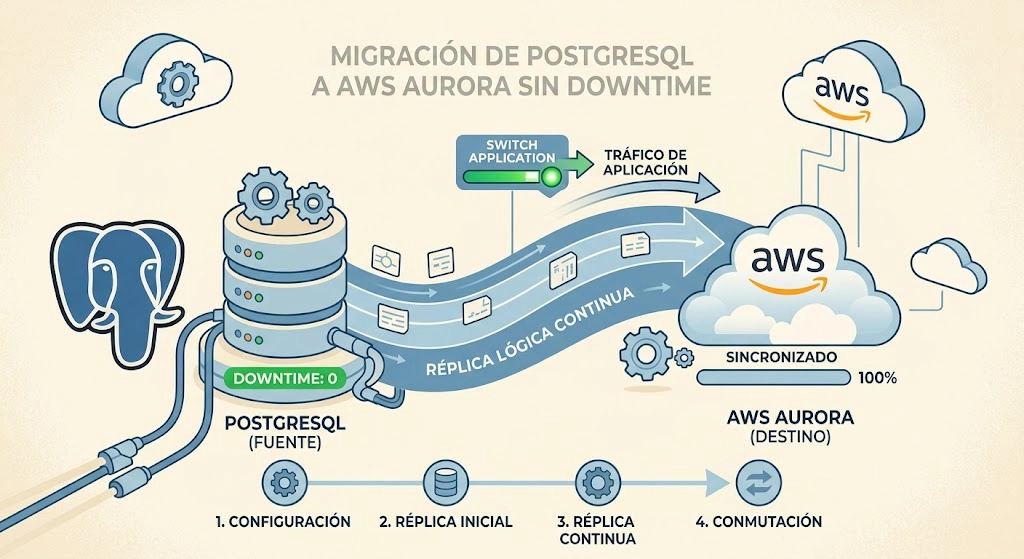
- Continuous Background Replication: We spun up the Aurora cluster from a PostgreSQL snapshot and configured continuous replication using AWS DMS (Database Migration Service) to keep both databases in sync in real time.
- Agile Routing with Route 53: Instead of redeploying the application to update environment variables, we routed database connections through an Amazon Route 53 private DNS record configured with a low TTL (30 seconds). This allowed the microservice to switch databases in seconds.
- Controlled Degradation (Read-Only Mode): To eliminate race conditions or lost transactions during the cutover, we decided to halt writes for a few minutes. We managed this via a feature flag: when enabled, write endpoints temporarily returned an HTTP
503 Service Unavailable, while read requests continued to be served seamlessly.
3. Cutover Time: 3:00 AM
We scheduled the migration for the early morning hours on a low-traffic day to minimize blast radius if anything went sideways.
The execution was down to the minute:
- Sync Health Check: Verified that the replication lag between PostgreSQL and Aurora was practically zero.
- Write Cutoff: Toggled the feature flag on. The microservice transitioned into read-only mode.
- Transaction Drain: Waited a brief moment for DMS to apply the final remaining replication log entries.
- DNS Switch: Updated the Route 53 DNS record to point to the AWS Aurora cluster.
- Connection Draining & Stabilization: Watched active database connections drop to zero on PostgreSQL and smoothly establish on Aurora.
- Reopening Writes: Toggled the feature flag off. Normal operations resumed at 100%.
4. Key Takeaways and Results
The entire maintenance window took roughly 30 minutes, mostly dedicated to verification and monitoring. The actual impact on end users? Only 3 minutes without write operations; all read traffic and core platform queries operated without interruption.
Zero-downtime migrations aren’t about “magical zero failures”—they’re about planning and controlling graceful degradation:
- Investing time to validate DNS TTL propagation and test feature flags before touching production was what gave us confidence.
- Designing your microservices to gracefully support temporary read-only states protects data consistency without requiring a full system outage.